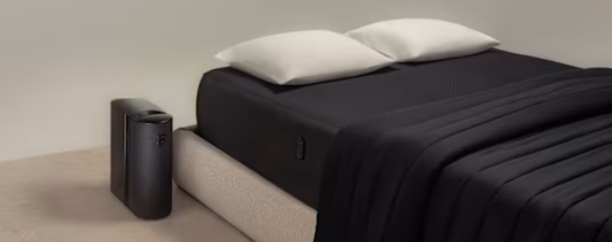
How to Set up the Eight Sleep Pod 5: Complete Step-by-step Process
Setting up the Eight Sleep Pod 5 looks more complicated than it actually is. This guide will break down everything step by step so you know exactly what to expect before, during, and after installation.
Most people start looking for better sleep as something just feels off, maybe overheating at night or waking up less rested than they should. Once you start exploring smart sleep solutions, it’s easy to assume they’ll be complicated or too technical to set up.
The Eight Sleep Pod 5 looks advanced at first, but the setup is actually more straightforward than expected. This guide breaks it down step by step so you can go from unboxing to your first night of use without confusion or unnecessary guesswork.
Is Setting Up the Pod 5 Complicated?
At first glance, setting up the Eight Sleep Pod 5 looks complex as it includes a Hub, water system, and app setup. But in reality, it is mostly just a simple process of connecting things and placing them correctly rather than anything technical.
Each part is designed to guide you through the process. The Hub connects through the app, the cover fits like a fitted sheet, and the water system only needs a basic fill and quick setup. There are no tools or complicated installation steps involved.
Pre-Setup Checklist
Before you start setting the Pod 5 up, it helps to have a few essentials ready. The process is simple, but having everything in place makes it smoother and faster.
What You’ll Need Before Setting Up:
- Distilled water: For filling the Hub’s tank and preventing buildup.
- Eight Sleep App: Needed for guided setup and device pairing.
- Stable WiFi connection: Required to connect and configure the system.
- Unmade bed: Strip all bedding before placing the Pod cover.
- Second person: Not required, but helpful for lifting or adjusting heavier parts.
Step-by-Step Eight Sleep Pod 5 Setup Guide
The setup process is more about simple placement and connection than anything technical. Once you go through using the steps below, it feels straightforward to follow.
Place the Hub
Start by unboxing the Hub and keeping it upright, then place it next to your bed or on a nightstand. Plug it in and wait for the light to flash blue, which takes about a minute, then connect it to WiFi using the Eight Sleep App.
Install the Base
If you have the adjustable base, remove your mattress and assemble the left and right sections. Connect the labeled cables, lock the structure in place, and plug it into a power outlet to complete the base setup.
Put on the Pod 5 Cover
Remove all bedding and place the Pod 5 cover directly on your mattress like a fitted sheet. Route the water cords neatly and connect them to the Hub until you hear a click, then plug in the USB connection.
.webp)
Connect the Blanket
If you are using the blanket then lay it over the mattress like a duvet insert. Attach the water connectors at the foot of the cover and secure the cords under the bed for a clean setup.
Prime the System
Fill the Hub tank with distilled or filtered water and place it back securely. Then follow the app instructions to start priming, which circulates water through the system to get everything ready.
Final Check
Once priming is complete, your system is ready to use. You can put your regular bedding back on top and start adjusting temperature settings directly from the app.
Things to Keep in Mind When Setting up the Bed
Before you start using the bed, there are some practical things worth keeping in mind. These small details can make the setup easier and help you get the best performance from the system right from the start.
WiFi is Necessary
The Eight Sleep Pod 5 relies heavily on a stable WiFi connection to function properly. Without it, the Hub cannot sync, control settings, or run updates, so a strong and reliable connection is essential for the system to work as intended.
Keep Enough Space Around the Hub
Make sure the Hub is placed in an open area with proper airflow. It should not be cramped between furniture, as it needs space to operate efficiently and stay ventilated.
Avoid Bending the Tubes
When routing the water lines, ensure they are not kinked or sharply bent. Keeping them straight and free-flowing helps maintain consistent performance and prevents unnecessary strain on the system.
Start with Moderate Temperature Settings
It’s a good idea not to push extreme temperature settings on the first few nights. Give your body time to adjust, then gradually fine-tune the cooling or heating based on your comfort.
FAQs
How Do You Factory Reset the Eight Sleep Pod?
To factory reset the Eight Sleep Pod, use the settings in the Eight Sleep app or follow Hub reset instructions to restore it to default settings.
Does the Eight Sleep Pod 5 Need WiFi to Work?
Yes, the system relies on WiFi to connect the Hub, control settings, and run key smart features properly.
Can the Eight Sleep Pod 5 Work Without the App?
No, the app is required for setup, temperature control, and managing sleep settings.
What happens if Wi-Fi disconnects?
Basic functions may be limited, but the system may retain the last settings until connection is restored.
Setting up the Eight Sleep Pod 5 is simpler than it looks once you follow the steps. After the setup, you can start adjusting temperatures and letting the system handle your sleep comfort automatically. If you’re ready to get started, use the Eight Sleep discount code at checkout to save on your purchase.
For more guides and how to’s on everyday life, stay tuned to SaveToMyCart.
RELATED BLOGS
-

Mint & Lily Review: Best Personalized Jewelry Picks
Looking for affordable personalized jewelry? Explore Mint & Lily’s popular necklaces, rings, bracelets, and earrings, plus what to know before ordering custom pieces.View -

Best SUNNYLiFE Products for Pool & Beach Days
Explore the best SUNNYLiFE products for pool and beach days, with practical picks for kids, babies, adults, and family water fun.View -

How to Use Rentcars Without Getting Caught Out At The Rental Counter
A confirmed reservation does not settle every detail at pickup. A few checks before you travel can prevent card, deposit, and counter problems.View -

Fiido D11 E Bike Review For Everyday City Travel
Compact storage and electric assistance sound ideal for city life. This review looks at where the D11 delivers and where everyday habits still matter.View -

Cleanster.com Review 2024: Is This the Ultimate Booking App for Cleaning Services?
Looking for reliable cleaning services? Read our comprehensive Cleanster.com review for 2024. Learn about features, pricing, and Airbnb turnover solutions.View -

Why Watches Are One Of The Most Complementary Accessories To Own
There’s no doubt, watches are one of the most complementary accessories one can own.View -

The Key To Your Outfit Footwear
The right pair of shoes is essential for finishing off an ensemble and expressing one`s personality.View -

A Little Spark And You Are Perfect
Every dress is greatly influenced by jewelry, which may make a basic, uninteresting appearance sparkle.View